Tuesday, December 1, 2009

Search Strategy: Successive Fraction

(Competency #6 : Search Strategy)

Successive Fraction Strategy
This strategy is the opposite of the snowballing approach. Instead, a search is conducted using a broad term, and narrowed down with use of limiters, Boolean operators, and a second facet.

Database: WorldCat
Topic:
What kinds of online adult programming are other public libraries offering?


The broadest facet in this topic is “adult programming”. Other terms that will help narrow results are “online” and “public libraries”. Below is a list starting with the broad term and two facets to narrow results. Last, I limit what is retrieved to list only books.
1. KW: adult program*
Results: 43,056!

2. KW: online
Results: 484

3. KW: public librar*
Results: 16

4: Limiter: Books
Results: 6 items

Of the six items retrieved through use of this strategy, I was able to locate one item useful to my topic:

Libraries without walls 4 : the delivery of library services to distant users : proceedings of an international conference held on 14-18 September 2001, organized by the Centre for Research in Library and Information Management (CERLIM), Manchester Metropolitan University.

Peter Brophy; Shelagh Fisher; Zoƫ Clarke

2002

English Book 299 s.

London : Facet Publishing, ; ISBN: 185604436X 9781856044363

Lifelong learning is becoming a reality throughout the world, requiring that learning opportunities and materials are delivered to citizens in their locality, at home or at work. Increasing numbers of students are undertaking distance education programmes and libraries are being called upon to find innovative ways to support distance learners. Developments in technology are creating new possibilities for document delivery and the distributed virtual library....

Search Strategy: Specific Facet First Approach

(Competency #6 - Search Strategy)

 Specific Facet First Strategy
In the specific facet first strategy, the most unique term is used to conduct the first search adding other terms and checking the results to determine what gives the best results. This strategy has similarity to the building block approach.
Database: Library Literature
Topic: How to plan for and implement a chat reference service at the public library?
The most unique term identified in this topic is “chat reference” (a phrase rather).

1. Using the basic search function the terms “chat reference” retrieved 155 records.
2. To focus my search, other “unique” terms from the topic are plugged in one by one to refine my results. Terms: plan, implement, public library
3. The next unique term, and most important, is “public librar*”. To add in my search string, I have selected to modify the original search. This came up with a total of 19 records.
4. The last term, “implement*”, is also truncated to retrieve results containing implement, implementing, implementation. The final results show 3 records; one with promising information.


Ward, J. (2003). "Going It alone: Can a small/medium-sized library manage live online reference?". The Reference librarian (0276-3877), (79/80), p. 311.


The use of this strategy is straightforward and easy to use because of its similarity to the building block strategy which is very simple to conduct.

Friday, November 20, 2009

The Library of Congress: Digital Preservation

(Competency #10 : Internet)

Using Google's search engine, I typed in different combinations of keywords with hopes of finding an alternative site to Library of Congress, but none were found. Keywords included: digital preservation, preservation tools, preservation materials, preserving digitally, etc.

With kw: digital preservation, The Library of Congress > Digital Preservation website was listed as the number one result. Others listed in the top ten were organizations (universities, companies, etc.) and those with blogs on the subject that have not been updated in the last year or two. I've decided to list LC's Digital Preservation website. LC DP provides newsletters, access to digital collections, a list of tools and partners, publications, podcasts, and the list goes on. This by far has been the most useful (up-to-date) website with a chock full of helpful links, information, and resources.

 http://www.digitalpreservation.gov/


Sunday, November 8, 2009

Multimedia - The Museum of Lost Formats

(Competency - Multimedia)


These images were retrieved from http://www.slowpokecomics.com/. The first image covers the evolution of devices that were used to preserve information: from the binary slab, floppy, cd-rom, to the jump drive. Essentially the devices used to save information are becoming more compact than the previous with increasing storage space.

The second image I thought was pretty funny. This image portrays Google's take over of people's lives through video/imaging and even beyond on other planets.

The last image depicts the lifestyles we are beginning to see of people who are involved with social networking and the web 2.0. The notion that so many are increasingly spending time on these sites to keep up with life that life itself is being passed up. Hmmm...?

Monday, November 2, 2009

DIALOG - Command Search

(Competency: Module 8 DIALOG)

DIALOG- ERIC database
From reading people’s responses and reactions, I was a bit intimidated about logging onto DIALOG. The warnings of “don’t forget to logoff” begin to ring in my head leading me to think that I MUST create a script and understand DIALOG before logging in and running the cost up. Not knowing what to expect was helping me delay this mini-assignment. I had to read through the PPTs a couple a times before actually deciding to enter DIALOG for the first time.
I had to log in once before actually creating and entering my script. A few minutes on DIALOG made the difference in the world. I was ready to experiment with my script and see what the outcome would be.
My topic was originally on “the use of instant messaging or chat to provide a virtual reference to the public”. I constructed a script highlighting the terms to include in SS, but retrieved zero results in both ERIC and LIS. I was surprised with the recall being zero.
Instead, I constructed a script based on another topic: “library online tutorials for adults”
Commands:
1. B1
2. SS reference service or online tutorials or library instruction
3. SS librar?
4. SS distance education or adult education
5. SS# and SS# and SS#
6. Total results and cost

Below is a screenshot of my DS and number of items retrieved for each set.


Figure1: Display Sets – ERIC database


Sifting through the first 10 results, I found two possible candidates. However, I was not pleased with the other articles listed in the top 10. The script retrieved poor results. This may be due to my word choice and organization within the sets.


4. 9/8/4 DIALOG(R)File 1:(c) format only 2009 Dialog. All rts. reserv. 011938680 ERIC Number: ED503305
Education for a Digital World: Advice, Guidelines, and Effective Practice from around the Globe
2008 (20080000)
Descriptors: Educational Strategies; Learning Problems; Instructional Design; Management Systems; Copyrights; Media Selection; Online Courses; Quality Control; Program Effectiveness; Articulation (Education); Educational Technology; Computer Uses in Education; Developing Nations; Foreign Countries; Access to Education; Computer Software; Educational Planning; Student Evaluation; Teaching Methods; Educational Games; Teacher Effectiveness; Teacher Evaluation; Student Participation; Adult Education; Cooperative Learning

Identifiers: Ghana
Dialog Update Date: 20090921; 04:57:02 EST
ERIC (Dialog® File 1): (c) format only 2009 Dialog. All rights reserved.

9. 9/8/9 DIALOG(R)File 1:(c) format only 2009 Dialog. All rts. reserv. 0011692183 ERIC Number: ED501561
Online Education for Lifelong Learning
2007 (20070000)
Descriptors: Lifelong Learning; Distance Education; Second Language Instruction; Constructivism (Learning); Higher Education; Self Management; Early Childhood Education; Foreign Countries; School Community Relationship; Professional Development; Case Studies; Libraries; Adult Students; Instructional Effectiveness; Online Courses; Learning Theories; Computer Mediated Communication; Educational Change; Teacher Competencies

Identifiers: Turkey; Micronesia
Dialog Update Date: 20090921; 04:57:02 EST
ERIC (Dialog® File 1): (c) format only 2009 Dialog. All rights reserved.


Upon logging off DIALOG, the breakdown of my cost for using DIALOG was displayed:


Figure 2: Cost for command search-ERIC database

Search Strategy : Citation Pearl Growing

(Competency #6 - Search Strategy)


Pearl Growing Strategy
The citation pearl growing strategy, also known as ‘snowballing’, involves conducting a search and searching for terms/descriptors within the results that can be used in a modified search to improve recall. The terms/descriptors being looked for are also known as pearls.

Database: ERIC

Topic: How to create and distribute online tutorials on computers for patrons?
1. Search is conducted using only the terms identified in my topic: create and distribute, online tutorials, computers, patrons
2. Using the terms bolded above, I retrieved zero results. To improve my recall, I decided to remove “create and distribute” from my SS. “online tutorials, computers, patrons”

By doing this I was able to retrieve one hit:

Blake, L. (2009). On campus or out of town: How publishing online tutorials can help your patrons. Computers in Libraries, 29(4), 11-13,. Retrieved from http://ezproxy.twu.edu:2052

Using this article, I searched for pearls within the descriptors:

Library Services, Online Courses, Library Instruction, Reference Services, Instructional Design, Enrichment Activities, Tutorial Programs, Distance Education, Electronic Publishing, Adult Education

3. SS = (online tutorials OR library instruction OR tutorial programs) AND (computers) AND (patrons)

The recall was positive and really improved using the pearls identified from the article obtained from the first search. A total number of 39 articles retrieved. I reviewed the first 10 and was satisfied with them.

Further “pearl-digging” can be done to increase recall and even refine your search to achieve high precision.

Saturday, October 24, 2009

Search Strategy: Building Block Approach

(Competency #6 - Search Strategy)


Building Block Strategy
The building block approach takes single facets (or concepts) and synonyms of each facet and ties them together in a search string using Boolean operators.

Database: Academic Search Complete (ASC)
Topic: What are some of the issues and trends with virtual reference service in academic libraries?


1.) Facets are identified within the topic/question. What are some of the issues with virtual reference service in academic libraries?

Facet1: issues
Facet2: virtual reference
Facet3: academic library

2.) Synonyms of each facet are identified.

Issues: outcome, results
Virtual reference: online reference, electronic reference, chat reference, live reference
Academic libraries: academic library, university library, college library

3.) Pulling all facets and synonyms in a search string with the use of Boolean operators “AND” and “OR”. Nesting is involved to create our search string. Parentheses are used to nest the terms within the search string.

Search string: ((issues or outcome or results) and (virtual reference or online reference or electronic reference or live reference) and (academic library or university library or college library))

Plugging this search string in ASC database, a total number of 46 records were retrieved. Below is a screenshot of the results. It shows both the recall number and how the search string was plugged in this database


Saturday, October 17, 2009

Search Strategies – Improving Results

(Module 6 – Search Competency)


In a previous post, I stated my search strategy and results for “digital preservation” using the Eric, WorldCat, and Library Lit databases. To improve results, I have applied some search techniques to construct a search strategy. For each of the three databases, I have used a technique or combination of basic techniques.
Initially, my search topic was “digital preservation,” but this is too broad of a topic. Instead, I have refined my topic in a question format, “How to digitally preserve a library?”
Next, I identified the facets in this topic: “digitally” “preserve” “library”
Eric Database
Search Strategy: Boolean Search String
Boolean Technique
Using these facets, synonyms (or sets) are listed to extract create a Boolean search string.

Synonyms
Digitally: digital, digitization, digitizing
Preserve: preserving, preservation
Library: books, materials

Using Boolean operators OR and AND, we construct a search string with parentheses used:
((digital or digitization or digitizing) and (preserving or preserve or preservation) and (books or materials))

For my first time applying a Boolean search string I got a very acute list of results.

ERIC results for: (kw: digital or kw: digitization or kw: digitizing) and (kw: preserving or kw: preserve or kw: preservation) and (kw: books or kw: materials). Records found: 156

Browsing through the first 10 hits listed, I like the results so I go forth using this search string and an attribute. I chose to limit my results published in 2006-2009 by selecting the publication year attribute.

Total records retrieved were 12.

Of these records, I selected record #12. Not only does this answer my question, but this article provides critical information on how to download, install, and set-up a FREE software package used to digitize library printed materials.

Lots of Librarians Can Keep Stuff Safe: Libraries Are Able to Safeguard Content with LOCKSS, Open Source Digital Preservation Software By: Karen G Schneider 2007
English Article (EJ) 2
Library Journal, v132 n13 p30-31 Aug 2007
Reed Business Information. 360 Park Avenue South, New York, NY 10010. Tel: 646-746-6819; Fax: 646-746-6734; e-mail: ljinfo@reedbusiness.com; Web site: http://www.libraryjournal.com
(Quick Sum/Intro of Article Below)

Over the next several decades, libraries will face the potential loss of all the e-journals, ebooks, electronic theses, local digital collections, and other "e-stuff" curated for the public good. A solution to this problem is LOCKSS ("Lots of Copies Keep Stuff Safe"), a free, open-source digital-preservation software from Stanford University that preserves digital content in a library-to-library network, just as multiple libraries keep copies of the same book....


WorldCat Database
Search Strategy: Truncation

Using the same facets identified earlier, I will truncate these facets to retrieve different forms of a term. This is done by adding a symbol at the end of the term. In some cases, left and middle truncation can be used.

Truncated words:
Digit* (I am not sure if this is the best term to truncate that would include digitization, digitize, and digitally)
Preserv* : preserve, preservation, preserving
Librar*: library, libraries (I thought it easier to use “library” as oppose to books or materials)

In addition, operator AND will be used to string these three terms in our search input. ((digit*) AND (preserv*) AND (library*))

Using this search string, a total number records found were 18,385 and only 11,113 are in English.

To narrow down my search, I limited my search to list only those in English language. This brought down the number by a little more than a third.

The use of truncation really pulls in a number of records, and is most effective when used after a technique has been applied such as Boolean ops, field and proximity searching. Using both truncation and type of language (English), the title field attribute was set to locate records with titles containing these facets and its variations. Number of records totaled 270. Applying another limiter, publication year 2009, a shorter list was retrieved. Here is the search string used to get these 11 results.

WorldCat results for: yr: 2009 and ((la= "eng" and (((ti: digit* and ti: preserv*) and ti: librar*)))).
Records found: 11

Although, I did not get the results I was hoping for, I did retrieve some interesting articles shedding light on the copyright issues. These records covering copyright issues are essential to understanding the specifics on how to begin a digitizing project at your library. Perhaps my topic could have been constructed differently, or the use of truncation might have been too much for these three facets. Another point I want to make is the search string that WorldCat shows the searcher with the results. For some reason the first two facets are nested together leaving the third separate. I am not sure how this came to be, but I played with the provided operators to see if it would change the nesting placements. Through trial and error, I was wrong.

Tuesday, October 6, 2009

Tagging on LibraryThing.com


(Competency #5 - Tagging/Indexing)

I selected the book, Digitizing Collections: Strategic Issues for the Information Manager by: Lorna M. Hughes for this week's competency. This book discusses the topics on the cost and benefits of such a project, selecting materials, funding digitization project, and managing this sort of project within a library.

Below are the tags associated with the book from LibraryThing.com:

archival science(1) digital files(1) digital libraries(1) digital preservation(1) digital retrieval(1) digitizing(1) Information Technology - Digital Preservation(1) library(1) non-fiction(1) read in 2006(1) retrieval(1) shelf 4(1) storage(1)

To see more on this particular book visit the address provided: http://www.librarything.com/work/193947/book/51694400

Monday, October 5, 2009

LibraryLit/BIP Database Search

Library Lit Database
Using this database, I performed a search for "digital preservation" in abstracts. A total of 220 records were retrieved with the criteria selected. I scanned through the first 30 records, and found zero articles relevant to what I was seeking. Instead, I changed the search to locate records with "digital preservation" in titles. A total of 360 records were obtained. After sifting through some of these, I was satisfied with what this search retrieved. To refine my search, I narrowed the number of hits to 28 by selecting articles published in the year 2009. Below is the article I chose from my search of "digital preservation" in titles and published in 2009.

Mani, N. (2009). Digitisation: Preservation and Challenges. DESIDOC Journal of Library & Information Technology, 29(1), 69-71. Retrieved October 5, 2009, from Library Lit & Inf Full Text database.


Books In Print (BIP) Database

My first attempt to search for videos on "digital preservation" using the QuickSearch on BIP was a failure. Only three hits were retrieved and not relevant at all to my topic of interest. On my second attempt, I decided to search a bit broader by selecting to search "digital preservation" using keyword indexing to retrieve results, and to locate books "in print" and "forthcoming." I total of 461 hits were retrieved. I selected the book below because this is a perfect resource for those who are needing to understand and have a step-by-step process on how to digitally preserve personal memories using current technology.

Baldridge, A. (2009). Organize Your Digital Life: How to Store Your Photographs, Music, Videos, and Personal Documents in a Digital World. National Geographic Society.

Monday, September 28, 2009

RSS Feed - Collections Preservation

(Competency #4 - RSS Feed)

For the purpose of this blog and ISAR course I am enrolled in, I have selected and provided an RSS feed of Collections Preservation from the Library of Congress - Digital Preservation site.

I chose this specific feed because it provides recent breakthroughs and technology concerning the topic of this blog. This feed is located to the bottom-right of my blog.

ERIC/WorldCat Database Search

How should one go about conducting a search to retrieve the most relevant records to a query? For my ISAR course I will take you step-by-step on my search using WorldCat and Eric databases through the Texas Woman’s University Library website.


In this case, I will be searching on the topic of library services and their trends in public libraries. I chose this topic because it interests me and I have a collaborative paper on this topic that I and group members are working on for another course. With the help of an outline our group has created for our paper, I have some knowledge of the topic and the direction of my search. As mentioned earlier, for my searches I used both Eric and WorldCat databases.


ERIC DATABASE
Performing my first search using Eric database, I used “library services”[abstract] and “public library” [subject]. Utilizing the advanced search, I entered the phrase “library services” and selected [abstract] as my index. I also wanted to results to include “public library”, and did so by selecting the Boolean operator [and] and by selecting [subject]. This retrieved 5,125 records or hits using these two phrases and the Boolean operator.


To refine my search to include only recent publications, I chose to refine my search by limiting my results to the publication year of 2009. This was selected to obtain the most current information. This gave me a refined total of 5 records!
Among the 5, I chose this record:

Imagine, Invent, Program, Share: A Library-Hosted Computer Club Promotes 21st Century Skills

Author: Myers, Brian Source: Computers in Libraries v29 n3 p6-9, 38-40 Mar 2009 (7 pages) Doc. Type: Article (EJ) Accession No: EJ831235 Libraries Worldwide: 2394 TEXAS WOMAN'S UNIV LIBR See more details for locating this item
WorldCat DATABASE

In my search using the WorldCat database, I used “library services”[title] and “public library” [keyword]. Utilizing the advanced search, I entered the phrase “library services” and selected [title] as my index. I also wanted to results to include “public library”, and did so by selecting the Boolean operator [and] and by selecting [keyword]. This retrieved 3,956 records or hits using these two phrases and the Boolean operator.

To narrow down the results, I limited the search to include results with the publication year 2009 and “library services” in the abstract. This retrieved 29 records, but none were relevant to my topic of interest.


Instead, I changed the phrase “library services” to “library program”. Subject field was used for library program, and same field was used for public library [keyword]. This pulled a list of 218 records. I limited the search to just records with the publication year of 2009; this retrieved a total of 2 records!


Among the 2, I chose:

Library programs online : possibilities and practicalities of Web conferencing /
Author: Peters, Thomas A., 1957- Publication: Santa Barbara, Calif. : Libraries Unlimited, 2009, Document: English : Book
Libraries Worldwide: 11

Sunday, September 20, 2009

Library of Congress Podcasts

(Competency #3- Podcast)

For my class, I performed several searches using various search engines to help me locate a podcast on or close to digital preservation, but was unsuccessful. The search engines used were those listed in my class (http://www.podcastzoom.com/, http://www.podanza.com/, http://www.podcastsearchservice.com/) and two outside aside from those (http://www.getapodcast.com/, http://www.google.com/). In my efforts, I was lucky to find podcasts that were rarely updated and/or did not pertain to my blog topic. Instead, I found interest in the Library of Congress' podcast available at http://www.loc.gov/podcasts/. Using Google's search engine, Library of Congress' podcast was retrieved in my top results list. The Library of Congress provides three podcasts for anyone to subcribe or browse through and they are: National Book Festival, Slave Narratives, and Music and the Brain.

  • National Book Festival Podcasts are interviews of the award-winning authors of books from the festival.
  • Slave Narratives Podcasts include both first-source interviews and histories of the hardships of slavery.
  • Music and the Brain Podcasts provide lectures, conversations and symposia on new research in cognitive neuroscience and music.
In a sense, any podcast is relevant to digital preservation. The use of a podcast is a practice of preserving information digitally. Explore any podcasts of interest to you, and remember that you are listening to information that has been digitally preserved for users like you to access now and in the future.

Monday, September 14, 2009

Digital Urban Blog

(Competency #2- Search Blog)

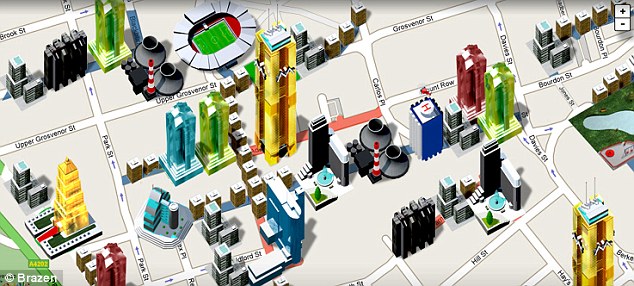
Using Google's Blog search engine, I was able to locate a blog of my interest. The name of the blog is Digital Urban, and just the name itself attracted me. Sort of like shopping for a book; one usually scans and judges a book by its cover. Not only did the name do it, but the most recent published post swept me away...Monopoly City Street. Here is an excerpt of the post from Digital Urban Blog:
"Google has teamed up with the people behind Monopoly to launch a global online version running on top of Google Maps and perhaps Google Earth (?). Details are scarce at the moment but an announcement is imminent via both the game's official site and the blog."
Image obtained from Digital Urban Blog; source: http://www.casa.ucl.ac.uk/andy/blogimages/citystreets.jpg on 9/14/09.
Aside from this very interesting post on Monopoly, I found lists of posts on Google and Google Earth. This blog covers just about everything Google is doing. Here is a clip of what the blog is about (http://digitalurban.blogspot.com/2005/10/about-digitalurban.html):
"Digital Urban is written by Dr Andrew Hudson-Smith, aimed at examining the latest techniques to visualise the city scape via digital media it covers a lot of the work going on at the Centre for Advanced Spatial Analysis, University College London."
If you are interested, this blog contains an RSS feed. It is also noteworthy to mention that this blog in particular has a whopping 3600 readers and counting! I think you might find something interesting on here. Check it out!

Saturday, September 12, 2009

Related Blog

Using Google's search engine, I was able to locate another blog on digital preservation. Most blogs listed in my search either had no posts related to the topic of my blog, or were "dead" blogs.

Ten Thousand Year Blog, http://davidmattison.ca/category/digital-preservation/

The author, David Mattison who is an archivist and historian in Canada, sheds light on what other organizations, companies, and countries are doing to digitally preserve their materials for future use. His blog dates back from October 2008 with blog posts not just on digital preservation, but from web 2.0 to digital archiving.

Wednesday, September 9, 2009

E-Library - Library 2.0

Breaking news! The Cushing Academy has made a huge leap towards the concept of an e-library. Their 144-year old library decided it was time to rid their collection of printed materials and go digital. Below is an excerpt of the article provided by The Boston Globe, published on September 4, 2009.

"This year, after having amassed a collection of more than 20,000 books, officials at the pristine campus about 90 minutes west of Boston have decided the 144-year-old school no longer needs a traditional library. The academy’s administrators have decided to discard all their books and have given away half of what stocked their sprawling stacks - the classics, novels, poetry, biographies, tomes on every subject from the humanities to the sciences. The future, they believe, is digital."

A Library Without the Books Article

(Source accessed on 9/9/2009)

Cathy on Digi-Preserv


(Competency - Image)
To view the image properly and with better quality, visit the link provided below.
Image derived from the Library of Congress site, Cartoon Image
, and from Universal Press Syndicate.
Accessed on 9/9/2009

The Library of Congress

A website filled with helpful links, information, and tools on digital preservation. Dive in to discover more on digital preservation:"Library of Congress: Digital Preservation"
Also, located on the bottom left-side of this homepage, there is a link to a short presentation on digital preservation. Check it out!

Friday, September 4, 2009

Introduction and Purpose

(Competency #1-Intro & Purpose)

Welcome to the Digital Preservation blog! This blog was created to compile my competencies of Information Storage and Retrieval. Designed for my Information Storage and Retrieval course, I will share and publish items learned throughout the course along with other helpful links.

I am currently employed at a public library working in the public services at the circulation desk. I am drawn to both academic and public libraries. My areas of interest are programs for patrons of all ages, circulation services, and digital preservation. This blog will include comments, resources, and other findings on digital preservation.

What is digital preservation? Digital preservation is the management of digital information that requires much attention in this world of fast evolving digital technology. Wikipedia provides a detailed definition: “Digital preservation is defined as: long-term, error-free storage of digital information, with means for retrieval and interpretation, for the entire time span the information is required for.” ( http://en.wikipedia.org/wiki/Digital_preservation )

As my course on Information Storage and Retrieval progresses, I will explore in depth the challenges and solutions to digital preservation in this digital age.